
Google has released a native Gemini App for Mac, giving macOS users a dedicated desktop interface for its AI assistant. The app, available for free starting April 15, 2026, allows users to access Gemini without opening a browser tab, using a simple keyboard shortcut to summon a chat window from anywhere on their desktop. According to Engadget, the Gemini App is a “native desktop experience” that builds on Google’s broader push to integrate its AI assistant across desktop platforms, following a similar Windows app release the day before.
The Gemini App is built entirely in Swift, specifically optimized for Apple’s hardware. It requires macOS 15 Sequoia or later and is available globally in all countries and languages where Gemini is supported. The app syncs seamlessly with a user’s Google Account, preserving chat history and preferences across devices. According to Google’s Michael Friedman, group product manager for the Gemini App, the company is “building the foundation for a truly personal, proactive and powerful desktop assistant, with more news to share in the coming months”.
Key Features of the Gemini App for Mac
The Gemini App introduces several features designed to streamline desktop workflows and reduce context switching:
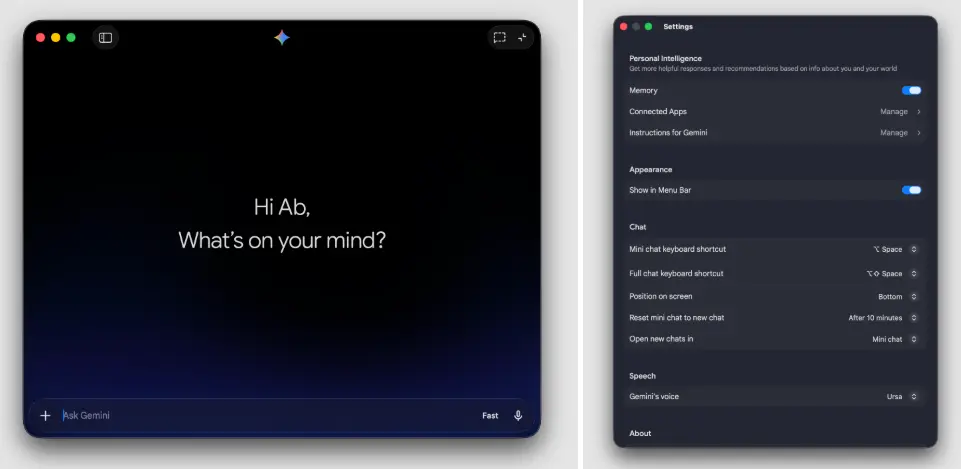
- Global keyboard shortcut: By default, pressing Option+Space opens a floating mini-chat window, while Option+Shift+Space launches the full Gemini App interface. Users can customize these shortcuts in the app settings.
- Screen sharing and context awareness: Users can share anything on their screen — including local files, images, documents, code, or complex charts — directly with the Gemini App. For example, a user reviewing a data chart can share their window and ask, “What are the three biggest takeaways here?” to receive an instant summary. Full webpage sharing is also supported.
- Creative tools: The Gemini App includes built-in support for image generation with Nano Banana and video generation with Veo, allowing users to create visual content without leaving their workflow.
- Integrated tools panel: The app features a toolbar with access to file uploads from local storage, Google Drive, and NotebookLM, plus tools for deep research, guided learning, Canvas, and Personal Intelligence.
- Voice and model selection: Voice input is available, and users can switch between different Gemini models directly within the app.
The App enters a competitive landscape of desktop AI. According to The Verge, OpenAI and Anthropic have offered polished Mac apps for ChatGPT and Claude, respectively, leaving Gemini users reliant on browser tabs. While Google’s Gemini App matches many of these competitors’ core features, it does not yet include the advanced desktop automation capabilities found in some rivals’ offerings. However, the Gemini App does offer native image and video generation tools that some competitors lack.
The app is available for download from gemini.google/mac. Basic functionality is free, with paid subscription tiers — AI Plus at $7.99 per month, AI Pro at $19.99 per month, and AI Ultra at $249.99 per month — offering increased usage limits and premium features.
In summary, the Gemini App for Mac delivers a long-overdue native desktop experience for Google’s AI assistant, offering instant keyboard access, screen sharing, and creative tools, all while syncing seamlessly with a user’s Google Account.