

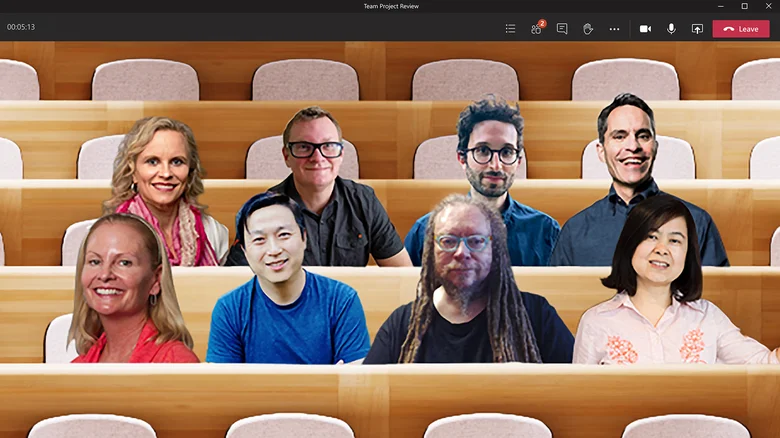
Microsoft has decided to remove a major video meeting feature from its communication platform. The company plans to stop offering the Together Mode feature, which showed several meeting participants in a shared virtual space, such as an auditorium or coffee shop. This change aims to make the user experience simpler and reduce the technical demands on personal devices.
As a result of this decision, Teams users will soon no longer have access to shared virtual spaces during their daily video calls. The company will encourage people to use standard presentation views instead. This unexpected change will affect how millions of remote workers and students interact during large online meetings.
Why is Microsoft removing Together Mode from Teams?
The virtual environment option was introduced in 2020, at the height of the global pandemic. It was designed to help with the fatigue people felt from looking at a grid of separate video boxes for long periods. By using smart technology to remove backgrounds and put everyone in the same virtual space, this feature made online classes and remote meetings feel more natural.
However, keeping this feature running across multiple devices caused significant backend issues. According to Microsoft, shared on its official Insider Blog, the shared-room feature increased cognitive load for everyday users. Furthermore, it created heavy system complexity when trying to sync across different software platforms.

The Teams feature also struggled to work properly on smaller hardware. On older mobile phones and budget computers, rendering a single, massive virtual room caused choppy video and dropped frames. Dropping the feature allows the program to run much faster on lower-end hardware.
Microsoft is moving everyone to Gallery view instead of the current complex layout. The familiar grid will use smart tile counts to help computers run smoothly and avoid overheating. By dropping Together Mode, more system memory becomes available. This lets developers work on improvements like better color accuracy, background noise removal, and higher-resolution video.
TRACCreations4E‘s technical roadmaps show that the removal process will move quickly. The feature and its custom scenes will be fully retired between early and late June 2026. Managers and system administrators should update training files and user guides before the deadline to help employees avoid confusion.
While some users will miss the fun office backgrounds, the change directly addresses common complaints about the software being too heavy and slow. By focusing on the simpler Gallery layout, the company hopes to build a faster, more reliable communication tool.
Upgraded alternatives for your next Teams Meeting
- Adaptive Gallery Layout: The grid view now adjusts to your screen size and keeps the video running smoothly, even on budget devices.
- Large Gallery View: In big meetings, you can see dozens of coworkers at once without slowing down your computer.
- Pin and Spotlight Controls: Hosts can easily highlight speakers or pin important presentations to the front of the screen.
- Custom Background Images: You can still hide messy home offices by using approved corporate background images behind your individual frame.
The shared virtual room is being redesigned to a simpler layout. The pandemic feature helped people stay connected during tough times, but now workplaces are focusing on smoother performance instead of extra visuals. The next software update will make your daily Teams calls clearer and easier to use.