
You can stop your CyberGhost subscription from automatically renewing by going to your account dashboard or the app store where you bought it. To get your money back, you need to call customer service within the 14-day (for monthly plans) or 45-day (for long-term plans) money-back guarantee period.
Refund Eligibility: If you request a refund within 14 days for a monthly plan or 45 days for a 6-month plan or longer, you will receive a refund.
Request for a Refund: Refunds don’t happen automatically; you have to contact CyberGhost support directly by email, support ticket, or live chat.
Important Difference: Canceling a subscription stops future charges but does not start a refund. These are two different things.

The CyberGhost refund policy and important requirements
You can try CyberGhost for free with their money-back guarantee, but the exact terms depend on your subscription type. You need to know what these windows mean before you can go on.
The most important thing to do is to act within the time frame of your guarantee. You can’t get your money back after this window closes, according to the official policy. To get a refund, find your invoice’s purchase order number or reference number. Thereafter, you can reach the CyberGhost support team through one of their official channels:
- 24/7 Live Chat: Click the support button on the CyberGhost website.
- Support Ticket: Submit a request through the support portal.
- Email: Send your request to
support@cyberghost.ro.
How to cancel your CyberGhost subscription?
If you cancel your CyberGhost subscription, it won’t automatically renew at the end of your current billing cycle. You can keep using the VPN until the time you paid for it runs out. You can cancel the item in different ways depending on where you bought it.
For subscriptions purchased on the CyberGhost website
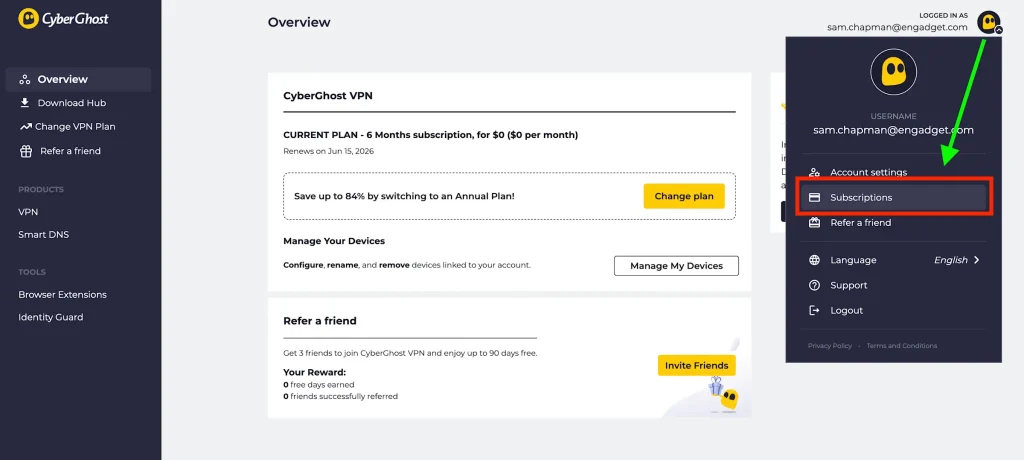
If you signed up directly at www.cyberghostvpn.com, do these things:
- Log in to your CyberGhost account.
- Select your profile logo in the top-right corner.
- Click “Subscriptions.”
- Click “Cancel Subscription” and then “Continue To Cancel” to confirm.
You will receive a message that says automatic billing is off. You should know that this action alone does not process a refund. If you are eligible, you will need to request one from customer support.
For subscriptions purchased through an App Store
You need to cancel through the app stores, as they handle billing for purchases made in the app.
- Apple App Store: Cancel via your iPhone/iPad Settings > [Your Name] > Subscriptions. For refunds, you must contact Apple Support directly.
- Google Play Store: Cancel via the Play Store app > your profile > Payments & subscriptions > Subscriptions. For refunds, you should contact CyberGhost support.
Account Deletion
As mentioned above, you need to cancel any active subscriptions before you can permanently delete your CyberGhost account. This way, you won’t have to pay again. After you cancel, you can delete your account:
- Log in to your account dashboard.
- Click your profile in the upper right.
- Select “Account settings.”
- Click “Delete my account“ and confirm.
Know that this is the last step. Your account can’t be restored, and all of your personal information will be deleted.