Microsoft now allows users to permanently pause Windows Update, ending more than ten years of mandatory automatic updates. The company shared this Update in a blog post on April 24, 2026. This is the first time since Windows 10 came out in 2015 that regular users can officially pause updates with no time limit. The new Windows Update improvements directly address years of user frustration over untimely disruptions.
According to Microsoft’s Aria Hanson, the team reviewed over 7,600 pieces of user feedback, with two recurring themes: disruption caused by untimely updates and insufficient control over when updates occur. The changes now rolling out to Windows Update include an indefinite pause option, separate shutdown controls, and more transparent driver information.
How does the new Windows Update pause feature work?
The most significant change to Update is the ability to pause updates with no practical limit. Users can now open Settings, navigate to Windows Update, and select a specific date on the calendar to pause updates for up to 35 days. Once that period ends, users can re-pause Update for another 35 days and repeat the process as many times as they want. There is no cap on how many times the pause can be reset. The new Windows Update experience includes several user benefits:
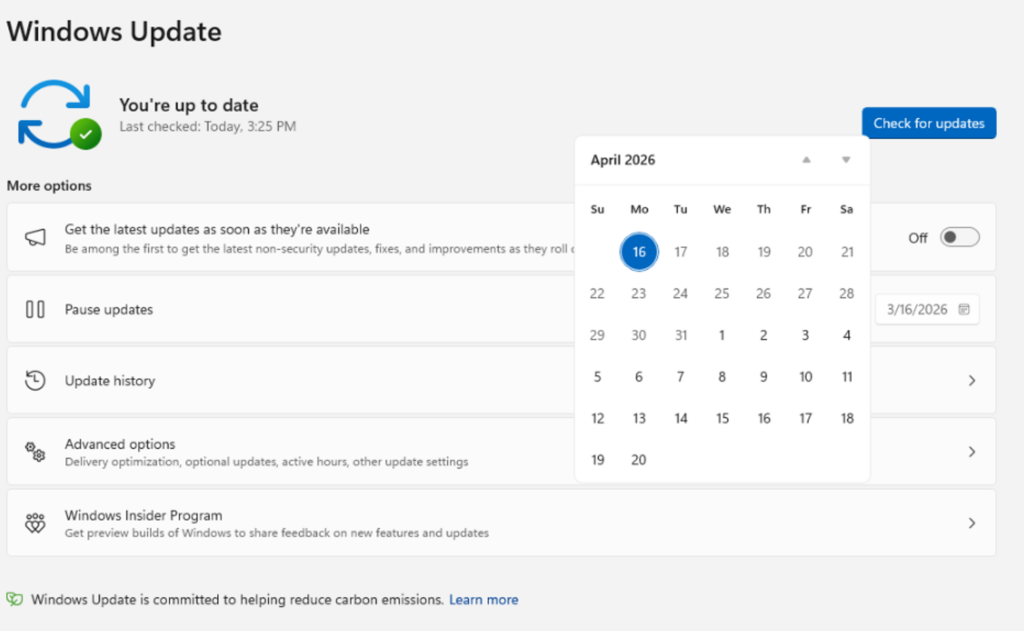
- You can now pause updates for 35 days at a time, and renew this pause as many times as you need.
- The Power menu will always show the usual Restart and Shut down options, even if updates are waiting to be installed.
- If you have a new device, you can now go straight to the desktop during setup without installing updates right away.
- Driver updates now list the type of device, like display, audio, or battery, instead of just showing a string of numbers.
- Microsoft will now combine driver, .NET, and firmware updates so you only need to restart your device once a month.
According to Microsoft, the improvements are currently rolling out to Windows Insiders in the Dev and Experimental Channels. A broader rollout to all users will follow in the coming weeks. The Windows Update changes also include a major quality-of-life fix: users can now restart or shut down their PC without being forced to install pending updates. Previously, the power options would change to “Update and restart” or “Update and shut down” when updates were due. That forced behavior is now gone. The standard Restart and Shut down options are always available, while update-specific choices remain optional.
In conclusion, Microsoft’s new Windows Update is the first big change to its update policy in more than ten years. Now, users have more control without losing device security. You can pause updates as long as you want, choose when to shut down, and restart monthly. This update finally gives users real control.