

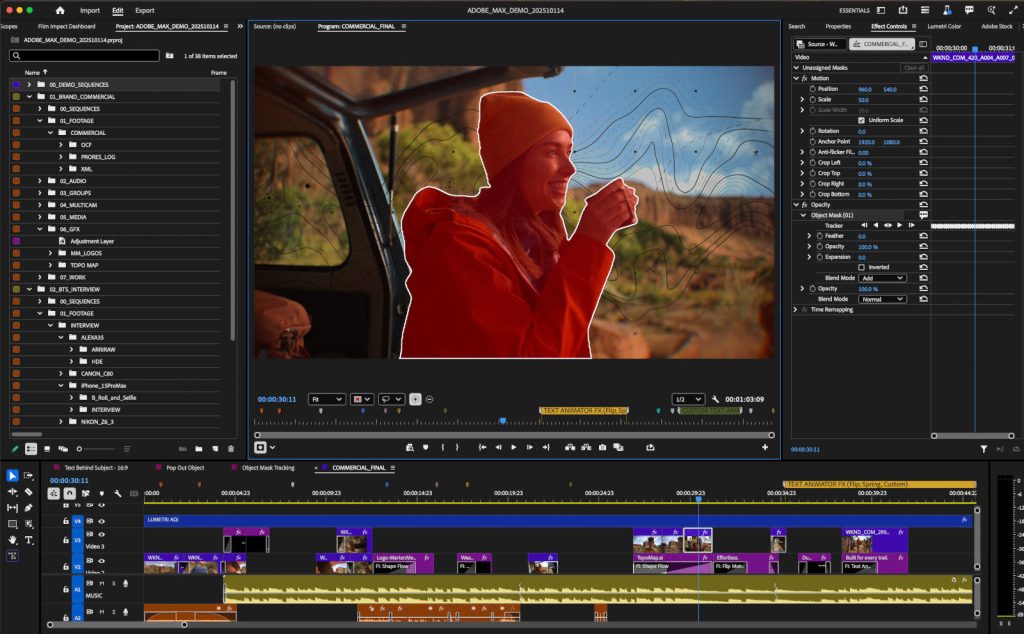
The main thing to know about the update is that it includes Object Masking, a new AI-powered video editing tool. Adobe says editors can now make an exact mask by hovering over a person or object in a video and clicking. The mask will follow the object you selected around the scene.
One important technical detail is that the AI-powered video editing only happens on the user’s device. Adobe says that it doesn’t use this kind of thing to train its AI models. This method on the device puts the speed and privacy of data first for business users.
Adobe improved Shape Mask tools along with Object Masking. The controls on the new Ellipse, Rectangle, and Pen masks have been redesigned to make it easier to make small changes. Adobe claims these masks can watch video clips 20 times faster. With this huge speed boost, repeating tasks take less time.

It takes less time to repeat tasks with this huge speed boost. These simple AI-powered video editors aim to eliminate the need for manual tasks. That way, creators can spend more time telling stories and less time doing boring work like going through each frame-by-frame.
AI-Powered Video Editing extends to workflow and After Effects
Adobe’s apps are getting better at working together when it comes to AI-powered video editing. Adobe Stock is now fully integrated into Premiere Pro, making it easier to find and license assets.
Also, editors can easily drag and drop media from Firefly Boards, Adobe’s AI-powered digital canvas for mood boarding and making assets, right into their Premiere timelines. This makes it easy to move from the first AI-assisted idea to the final edited sequence.
The updates are for more than just Premiere Pro. Adobe has also added new features to After Effects to make it easier to use visual effects and motion graphics. People can now open SVG files that are often used in Adobe Illustrator directly in After Effects.
The software can create realistic graphics and objects with 3D parametric meshes, shapes such as cubes, spheres, and cylinders. These tools make it easier to create complex visual elements right inside After Effects.
Disclaimer: This article is based on information that can be found in Adobe’s official announcement. Adobe may change features, specs, and availability at any time. This content is only meant to give you information. It is not meant to be professional or technical advice.