

Mozilla has now added its Firefox AI guardrails to mobile devices. This change gives users more control over how they interact with artificial intelligence while browsing on their phones. With Firefox 151, Mozilla is bringing the same user controls from its desktop browser to iOS and Android. This update helps users maintain control over their digital experience.
If you feel overwhelmed by how quickly AI is being added to web browsers, this update gives you a simple way to opt out. According to Engadget, the new Firefox AI controls include a master switch to turn off all generative AI features, or you can choose which tools you want to use. Mozilla is focusing on transparency and user choice, setting itself apart as a privacy-first option in a world where AI tools are often added without asking users.
How to Manage Firefox AI Settings?
Bringing these controls to mobile helps solve a common problem for tech fans: not having enough detailed options in browser settings. Now that artificial intelligence is a regular part of web tools, many people worry about data privacy and feel that AI features could add unwanted clutter to their daily use.
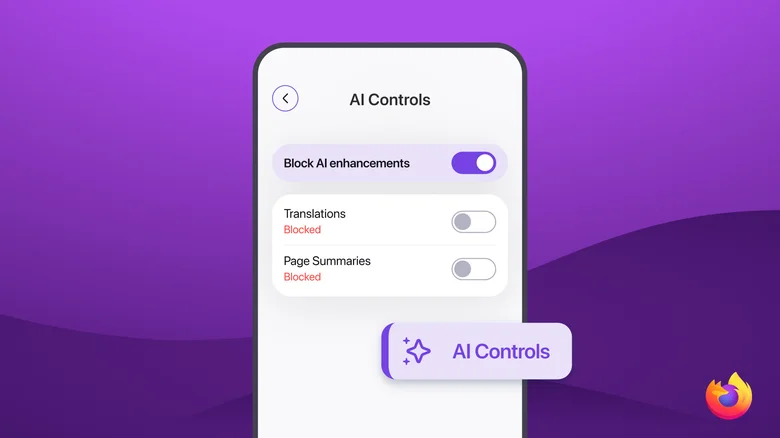
According to the official Mozilla Blog, managing these features is straightforward and requires only a few taps. Once your app is updated to the latest version, you can navigate to your settings to view the new menu. Here is how you can customize your experience:
- Access the Controls: Open your Firefox mobile app, navigate to the menu, and tap on “Settings.”
- Locate AI Controls: Inside the settings menu, you will find an “AI Controls” section.
- Toggle Features: From this dashboard, you can enable or disable individual features. For instance, you might choose to keep website translations active while disabling other AI-assisted tools, such as “Shake to Summarize.”
- The Master Switch: If you prefer an AI-free browsing experience, you can simply toggle the “Block AI enhancements” option to hide all current and future generative AI features from your interface.
This modular design is particularly helpful for those who rely on specific AI utilities—such as language translation—but wish to avoid the broader implementation of generative content tools.
Why user control matters in the era of AI?
Bringing these Firefox AI guardrails to mobile is a careful choice meant to build trust with users. Other major browsers might add AI models to their systems without making it easy to turn them off. Mozilla, on the other hand, believes that AI should work for the user, not the other way around.

The update brings improvements to existing tools. For example, the “Shake to Summarize” feature, named a top invention by TIME, will soon be available on more devices and in more languages. With this feature, users can quickly get short summaries of long articles just by shaking their device. Mozilla combines these productivity tools with strong privacy controls, so users can enjoy smart browsing without giving up control over their personal information.
The launch of these controls shows that Mozilla is taking a different approach to the web. While browsers compete to become smarter assistants, Firefox believes that giving users the option to say “no” is one of its most valuable features. If you care about privacy or want a balanced browsing experience, the new Firefox AI updates give you more control over how you use the web.