

Spotify Page Match is a new feature that facilitates seamless transitions between reading a physical book and listening to its audiobook. It quickly finds the right place in the Spotify audiobook by scanning the page you’re on with your phone’s camera. This tool is a big step toward making it easier for you to read more often and in different ways.
Spotify Page Match is a feature in the Spotify app that helps you meet new people. It connects the worlds of print and audio using optical character recognition (OCR) technology.
In short, it listens with its eyes: the camera scans the text on the page of your book and matches it to the right audio timestamp. Engadget says this makes it one of the first mainstream integrations of its kind that works without any problems.
How Spotify Page Match Works?
The process is simple and made to be easy. You don’t have to guess where you left off or mess with page numbers.
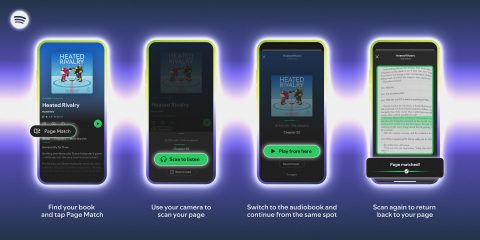
Here’s how to use Spotify Page Match:
- Open the Spotify mobile app and navigate to the page for the audiobook you’re listening to.
- Tap the new “Page Match” button, then select “Scan to Listen.”
- Allow camera access and hold your phone over the page of your physical book.
- The app scans the text and automatically jumps the audiobook playback to that exact moment.
You can also go backwards. If you’re listening and want to find your place in the book, use the “Scan to Read” option to see where you are on the page.
Why Audiobook Fans Need Spotify Page Match
This feature is more than just a cool trick; it helps multimodal readers with a real problem. The Spotify Page Match feature knows that the way we read changes throughout the day.
- It removes friction: no more searching by hand or trying to remember a phrase. Your switch between formats is quick.
- It fits your lifestyle: you can read at home and then listen to it on the way to work, while working out, or while doing chores without losing your flow.
- It signals Spotify’s commitment: this shows that Spotify is serious about making the site a great place for audiobooks, not just music and podcasts.

The new and useful Spotify audiobook syncing feature has some limits that you should be aware of. You need to buy or unlock the audiobook on Spotify’s platform to use the feature. OCR technology isn’t perfect either, and sometimes a small mismatch happens because of differences in book editions or page numbering, which means that you have to rescan a nearby paragraph.
A lot of people are getting the Spotify Page Match feature. It works with hundreds of thousands of popular audiobooks in English that you can find on the platform. The features work on both iOS and Android devices. You can use this tool if you have bought an audiobook or have a Spotify Premium plan.
FAQ
Q: What does Spotify’s Page Match do?
With Spotify Page Match, you can use a camera to switch between a real book and an audiobook without losing your place. It does this by matching the time in the audiobook with the page in the book that is currently being read.
Q: How can you make the most of Page Match?
To scan the page of your physical book with your phone’s camera, open your audiobook in the Spotify app, tap the Page Match button, and then do what it says on the screen. The app will take care of everything else.
Q: Do I need to have the audiobook on Spotify to use Page Match?
Yes, you need to have bought the audiobook on Spotify or found another way to unlock it to use the Page Match sync feature.
In conclusion: The Spotify Page Match feature is a smart way to connect physical books and digital audiobooks in a way that makes sense. You can read stories anytime and anywhere without having to worry about where you are.
This makes Spotify more useful and establishes it as a leader in the audiobook market. It seems like Spotify Page Match could become a standard feature for people who want to be able to read anywhere.